Launch class built onClaude+Notion

Live class

Your whole business, remembered.

Every email, every follow-up, every decision runs through you. That's not a discipline problem – that's a system problem. You're not behind on admin tasks, you're alone with them.

Next live class

Live online

OCT

29

Build your admin assistant in 1hr

Thursday · 3:00 to 4:00pm MT

Hosted by

Mike Rowe

Class Format

One hour, Q&A + Recording

Starts in

—
Days
—
Hours
—
Minutes
—
Seconds
Save my seat – $149

Space is limited.

Mike at his deskMike at his table

The workshop

One payment.
No subscription.

In one hour, we build your assistant together, on your own accounts. It gets a memory that lives outside your AI, learns how you work, and grows with you. You walk out with it working.

Next class

Next class: Thursday, October 29.

Seats are open now. One hour, live with Mike, on your own accounts.

—
Days
—
Hours
—
Minutes
—
Seconds
Build day is here.

Classes stay small, so everyone gets real help.

Make real progress in a small group: limited participants, designed around real setup and building together, so the time stays useful.

what happens in the class

Less AI theory.
More admin off your plate.

  1. 1

    Introduction to AI assistants

    A real morning, live: the daily brief, today's notes filed, and a reply drafted for you to approve.

  2. 2

    Building a memory layer

    Set up its memory in your own account. It takes minutes.

  3. 3

    Teach it your business and context

    How to do your onboarding interview. Watch your people, projects and preferences land on pages you own.

  4. 4

    Automations and scheduling

    We build your daily brief to kick off your day: Write it, correct it, set it to run daily.

  5. 5

    Talking, not typing. The voice experience

    Open your AI app and learn to run it by voice: tap the mic, and ask it to help.

  6. 6

    Q&A and followup

    We answer questions about how to customize your admin on your setup.

Save my seat – $149
Guaranteed

Your working assistant, day one.

Running on your own accounts after the workshop ends.

What you get

One assistant that knows your world.

Here's everything
you walk away with.

Voice Experience

Talk to it, anywhere

Just talk: in the car, between meetings, on a walk. It already knows your world, so it sorts your inbox, preps your next meeting and drafts replies for your yes.

Voice assistants like this usually bill by the minute. This one is fully built on top of the apps you already use, free!

A memory you own

Your people, projects and how you like things done, in a memory that's yours. Change AI next year, and it comes with you.

  • The core AI training, how it behaves and reasons
  • Assistant training playbook – from Harvard Business Review, Getting Things Done and Fair Play – with ongoing ability to grow and learn
  • A fully guided onboarding interview from your admin (you'll love it)
  • Complete memory workspace for life, work and business
  • Over a dozen ready-made admin skills from meeting prep to new project kickoff

Built live, with Mike

  • One hour, on your own accounts
  • Your daily brief, set to run on its own
  • Live Q&A as you go
  • 30 days of the recording, in case you miss something

Routines that run without you asking

  • A morning brief
  • Inbox training to learn how to write just like you
  • Meeting prep and a weekly review
  • Ask any time, or put them on a schedule

Trained to think like a
great assistant

100+ hours of development, built on how great assistants work (Harvard Business Review, Getting Things Done, Fair Play). A guided onboarding teaches it your world, project management is built in, and ready-made routines and skills run from meeting prep to a new project kickoff.

The live build class

One hour with Mike. You build it end to end on your own accounts, and ask anything as you go.

The Assistant Guidebook

Your owner’s manual: setup, a day with your assistant, and every prompt. You arrive ready to build.

Your Notion workspace

Its memory. Your people, projects and preferences, on pages you can read and correct. All instructions included.

Claude project files

The instructions that teach Claude its role and how to work with you, so it stops starting from zero.

Routines on your schedule

A morning brief, inbox checks, meeting prep and a weekly review. Ask any time, or set them to run on their own.

The workshop recording

Thirty days of private access to the full class. Rebuild it, or revisit any step.

One payment. The workspace and files are yours to keep.
Your AI plan (e.g. Claude Pro, $20 a month) is separate.

One time payment. The workspace and files are yours to keep.
Your Claude plan (Claude Pro, $20 a month) is separate.

Live: How it works

We build it live. Done together.

One hour, walked through live in a workshop with Mike. There's no technical knowledge required. It lives in your paid Claude account and your Modern Admin Notion workspace. free to keep forever.

1

Your Assistant Guidebook

Delivered when you sign up, it's everything you need to get going, use it well and keep getting more from it. It’s yours to keep.

The Assistant Guidebook

Start today
1Meet your assistant
2A day with your assistant
3What’s in the box
4Set it up: Claude, Notion, your tools
5Bring it to life
6Automations and every prompt
7Troubleshooting

Before the class · about 25 min

Set up Claude
Set up Notion
Connect your tools
2

Connect the tools you already use

Your inbox, calendar, Notion and docs, on Google or Microsoft 365, plus your meeting recorder. You choose what it can see, and you can take any of it away later.

3

Getting to know you

Paste your setup prompt and your assistant runs the onboarding interview: your people, your projects, how you like things done. Every answer is saved to your Notion memory, where you can read it and correct it.

Onboarding interviewQuestion 4 of 12

“Who are the people you work with most, and how do you like to keep in touch with each of them?”

Just answer out loud. It asks the follow-ups.

Onboarding interview

Saving to memory
Your people
Your projects
How you like things done…
Your routines

Let’s get to know each other. Who are the people you rely on most, and what do you usually need from them?

My business partner, my bookkeeper, and the school. Mostly scheduling and quick replies.

Got it. All three are on your People page now. Next: what does a normal week look like?

4

Working together

Start your day by talking. When you correct it or show a preference, it writes that to memory, so every week it needs less telling.

What do I need to focus on first?

Two things. Sarah confirmed Thursday, and the venue needs your deposit by Friday. Want me to draft the reply?

Yes please.

Draft is done and ready for you to approve. Want me to put together an agenda for your 10 o’clock?

Message or chat with your assistant…

Memory updated

Just now
Keep replies to three lines
School emails: loop in Lindsey
Mondays start with the week's priorities

Morning. What does today look like?

Three meetings. The 2 o’clock needs the revised quote, and it’s drafted. Two emails need you, and I’ve written replies. Want to hear them?

How it works

Your memory, your tools, your data.

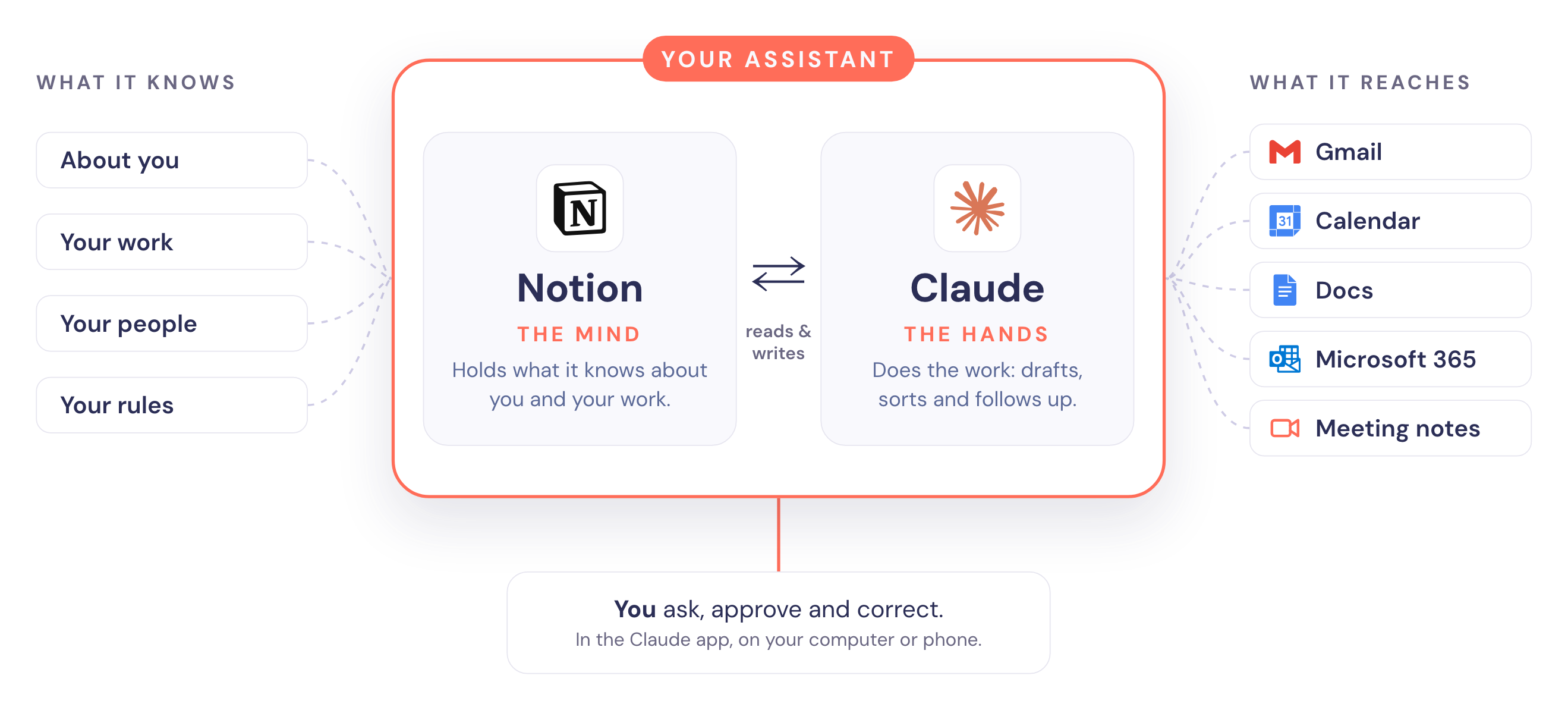
Your assistant: Notion is the mind and holds what it knows about you, your work, your people and your rules. Claude is the hands and reaches Gmail, Calendar, Docs, Microsoft 365 and meeting notes. You ask, approve and correct in the Claude app.

Working assistant, guaranteed. You leave class with it running on your own accounts, plus everything you need to keep it going.

From the class

Hear from actual customers.

“

I was drowning in followup and process… Even though I am not super techy, they walked me through enough to get started. In a few hours, I was able to talk to my Modern Admin (I've named him George)… I am blown away by how valuable George has been.

Kim Edwards · Financial, Retirement and Estate planning, Colorado

Kim Edwards

Mike Ruman

[Name 3]

[Name 4]

[Name 5]

Build it with Mike

Life is too short to hate email and follow up.

In 2015, after working my way to the top at a SaaS company, I realized that the job was not working for me anymore and most of my time was spent hating admin tasks. With hundreds of emails and dozens of meetings a week, I never felt like I was on top of things.

I eventually hired an admin. Together we built the systems and habits that took the admin tasks and distractions off my plate and gave me back my love for what I was doing. Since 2020 I’ve been a leadership consultant and completely focused on building teams and products that make life better.

Everyone’s buying “AI employees” looking for relief and, sadly, just getting more homework. This workshop is NOT that.

The Modern Admin is everything I’ve learned from years of getting admin off my plate, and hundreds of hours building AI assistants. You build yours with me, live, in one hour, on the tools you already use, and walk out with it working.

– Mike and Lindsey live with their three kids in Colorado

The price

Stop paying for AI you still have to manage yourself.

If you already pay for Claude, the missing piece isn’t more AI. It’s the context, structure and rules that turn a blank chat into an assistant built around your work.

Live class · Thursday, October 29

$149per seat
one payment

One hour, live with Mike. Seats stay small.
The workspace and files are yours to keep.

  • The live one-hour build class with Mike
  • The complete Modern Admin workspace and memory layer
  • Claude project instruction files
  • Connector setup instructions
  • Routines for your brief, inbox, meetings and week
  • The free book and role-description library
  • 30 days of access to the full recording
Save my seat

A paid AI plan (Claude Pro, $20 a month) is required and purchased separately. See our Terms and Privacy Policy.

You’re not really behind.
You’re just doing everything alone.

That part’s fixable.

You use nine tools daily.
None of them talk to each other.

Guess who’s the glue.

Get the admin off your plate.

Build your assistant live with Mike, on the tools you already use, and walk out with it working.

  • Next class: Thursday, October 29 at 3:00pm MT.
  • One payment. Yours to keep.
  • The recording for 30 days

FAQ

Frequently asked questions.

Do I need to be technical?

No coding is required. You do need to be comfortable following setup steps, connecting your accounts and building alongside me during the class. If you want somebody to do the entire setup for you, this is not that offer.

What do I need?

A laptop or desktop, Claude Pro, $20 a month, or any higher Claude plan, the Zoom desktop app, and access to the accounts you want your assistant to work with — including your email, calendar and workspace. The Claude mobile app is optional.

Is this Mac-only?

No. This version is built in Claude and Notion. There is no installer and no Mac-only requirement.

Is this a software subscription?

No. You're buying a seat in the live build class plus the workspace, instruction files, the free book and 30 days of access to the recording. The workspace and files are yours to keep. Your Claude plan (Claude Pro, $20 a month) is separate.

Is this a new app?

No. It’s Claude and Notion, set up to work together as your assistant. Claude does the thinking and talking, and Notion holds its memory. There’s no new software and nothing magic. You get the setup, the instructions and the know-how to make the two work as one, and it all lives in your own accounts.

How does it connect to my email? Can I use more than one account?

Your assistant connects through Claude’s own connectors, and each one links a single account: one Google account (Gmail and Calendar), one Microsoft 365 account, and one Notion workspace. Have a second inbox? Forward it into the connected one and your assistant sees it there. Calendars work the same way: anything shared into your connected calendar is visible to it, so share only what you want it to see.

Who owns my assistant’s memory?

You do, and it may be the most important part of all this. Everything your assistant learns about you, from your people and projects to how you like things done, lives in your own Notion workspace, not inside an AI company’s app. You can read it, correct it and keep it. If a better AI comes along, you connect it to the memory you’ve already built instead of starting over.

Can I use it by voice, away from my desk?

Yes, and it’s the best way to use it. Open your project in the Claude app on your phone, tap the mic and talk it through: sort your inbox, prep a meeting, plan tomorrow, from the car or between appointments. Voice is built into the Claude app, so there’s nothing extra to buy.

Is my data safe?

Everything stays in your own accounts: your Claude, your Notion, your email. It reads your mail only to do the job you give it, and nothing sends without you. You choose which accounts it can see, and you can disconnect any of them at any time.

Will this work for me?

If your days run on email, a calendar and a long list of things to remember, yes. It’s built for business owners, busy professionals and whoever runs the household, and it keeps life, work and business in one place.

What happens after the class?

You keep everything: the Notion workspace, the files and the free book. You have 30 days with the recording to revisit any step. Your assistant keeps learning every week you use it.

Does it run by itself?

Two ways, and you control both. Open Claude and ask, or set a schedule and it runs without you — the morning brief, the daily memo, the weekly review. What it is not is autonomous: it doesn't decide on its own to go do something. It runs what you told it to run, when you told it to run.

Will it send emails or make decisions without me?

No. The assistant can prepare, draft and propose. You approve. You stay in control of what goes out.

Do I get the recording?

Yes. You get private access to the full class recording for 30 days.

What if I can't attend live?

You'll still receive the recording and the materials, but this class is designed to be built live. The real advantage of being in the room is being able to follow the setup and use the Q&A while we're doing it.

Keep reading

Resources